

-
 Advanced Dating SoftwareThe Most Advanced, Mobile Friendly, Feature Rich Dating Software On The Market!Phone:FEATURES
Email:
Skype:
Start A Profitable Dating Site Today With
AdvanDate Dating Software Products.
Advanced Dating Software
The most advanced dating software on the market. More features than any other provider with free support and free upgrades.
Mobile Dating Software
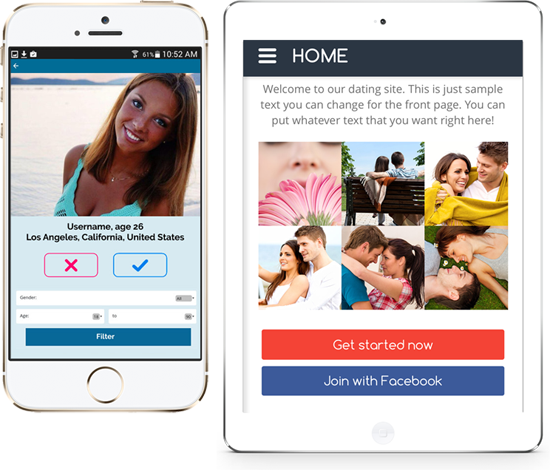
Capture your mobile users with responsive design and the Android and Apple Mobile Dating Apps. Also includes source code.
Responsive Design
Included in the dating software is a fully responsive design that adapts to any device your members are on. Whether it's a desktop or mobile phone.
Scamalyze™
Automatically stop scammers and spammers before they strike with Scamalyze by AdvanDate.
Free Upgrades & Support
Free support and free upgrades for as long as you own your dating website. A complete no worries approach.
Niche Dating Conference
The only niche market dating site conference for dating sites. Learn tips and techniques from the pros on how to be successful.
Our customers' success is what matters to us.
Fast setup and fast replies. That’s what makes a great company. Thank you everyone at advandate.
CorrieneGood clean software. Good support and great people. Rick knows this business more than anyone I know. Can’t wait for the conference. Looking forward to it.
TerranceSOther software providers just wanted our money and really ignored us after the sale. Advandate took great care of us after the sale. Being available by phone is key when you have questions. Thanks to you all.
NicksWHaving toyed around and used many dating software apps, AdvanDate is the most user friendly software you can get and the tech support you get with iCupid now is 2nd to none and the good thing is the upgrade from version to version is a smooth transition. I can’t recommend this script enough.
Usman AhmedVery happy with the software and service from AdvanDate. Great team over there and was always available. If you doubt their skills simply call and ask for Rick. You’ll be very surprised by the skill sets of this guy.
JoshuaKAdvandate truly is a one stop shop for all dating site needs. We just got the software a week ago and we started with the house dating traffic. We have reached 100 profiles now. There really is no need to go anywhere outside advandate for your needs. It’s a great team to work with. Rick is da man. He totally got what we were trying to do and even expanded on it. A great wealth of knowledge this man has. I can’t thank him enough!
MissyDatesAll other providers were complete crap. We eventually found you guys and so far we are deeply impressed with your software and service. When it comes to running a internet business, having options is key and Advandate delivers on that. You want a real review simply contact me. I’ll show you my site and how they helped us make a difference.
JeffRBest purchase I made in a long time. With Internet software it can be hit or miss when it comes to the company but after talking with Rick I felt at ease that the purchase and installation would go smoothly. It did and i’m happy with the sale. If there is one thing I can recommend it’s that you create more adult related templates. Thanks.
MichaelCOur review of advandate is that they have always helped us when we ask questions. If you like their software then we recommend it. We are based in Mexico and only have skype available to call the states. Since they are in same timezone it make it lots easier. Our previous provider blocked us on skype but advandate not do that. Very happy.
RobertoSGreat purchase with great support. So looking forward to this project. Thanks to Darren and Rick for getting our changes into the software so fast. Much appreciated.
DannyHi, I have tried several dating scripts and the one that AdvanDate provides is by far the BEST! The customer service is OUTSTANDING and the response time to any modifications that you want done to your site gets done in a matter of hours, even on the weekends!
OliverThank you guys for all that you have done. I really love the way the site is now. The new template design is awesome. As Ron Burgundy once said, stay classy AdvanDate!
DeanRWe engaged Advandate for 3 months of custom work for our new dating venture. From the beginning to the end, they took complete care of us and our needs. We couldn’t be happier with the results of our site. What we like best about Advandate is the availability of the staff. Darren and John were always available and completely professional. Great work guys. You don’t know how much we appreciate it.
TamilMUsed another provider and was not happy. Found out they were in Russia and it just didn’t make sense for me to deal with them since they didn’t answer their phone or understand what I was saying. AdvanDate is here in the states and Rick knows how to treat customers. I love my site. I just need more traffic! 🙂
MaryMAlways helpful and available. We like that. Software is working good to. We like new version and love new video chat.
DischenWhy Use AdvanDate?
Since 2002
AdvanDate has been in the dating software business since 2002. We were the first dating software provider on the market.
More Dating Software Features
AdvanDate offers more dating software features in our packages than any other dating software provider on the market. True story!
Industry Professionals
The AdvanDate Team consists of dating industry professionals that have been in the dating business for over 20 years!
Best Dating Software
AdvanDate has been nominated for Best Dating Software for 3 years in a row with the International Dating Conference.
Multilingual
AdvanDate is multilingual software. Easily operate your dating business website in several countries. We already translated AdvanDate software into 27 languages.
Most Affordable
The AdvanDate dating software is the most affordable and most professional dating software application on the market.
 There's Even More!
AdvanDate offers one of the most unique dating software applications on the Internet. The AdvanDate Professional Dating Software version 13 is full of the features that professional dating sites have plus it's Fully Responsive (Mobile Friendly) and has 10 times more features than any other dating application! Yes, 10 times more dating software features and that will make your dating site amazingly awesome! It also comes with the Mobile Dating App and over 60 Free dating templates, Free support and Free upgrades.
Best Dating Software
AdvanDate has been nominated in the categories for Best Dating Software and Best Affiliate Program from the International Dating Conference (iDate). We would like to thank all the people that voted for us. We're proud to be nominated. It shows that we're doing right by our customers.